dah lama tak post dalam bahasa melayu..hu..kat sini nak share majalah HITB.kat website ni
http://magazine.hackinthebox.org/
selamat membaca :)
Thursday, March 24, 2011

Thursday, March 17, 2011
How Antivirus Software identifies threats!
Most of us are aware how Antivirus Works and updates. As ever increasing threat from virus and other malicious programs, almost every computer today comes with a pre-installed antivirus software on it. In fact, an antivirus has become one of the most essential software package for every computer. Even though every one of us have an antivirus software installed on our computers, only a few really bother to understand how it actually works and updates.
An antivirus software typically uses a variety of strategies in detecting and removing viruses, worms and other malware programs.
Signature-based detection – Dictionary based
Heuristic-based detection – Suspicious behavior based
1. Signature-based detection – Dictionary based
This is the most commonly employed method which involves searching for known patterns of virus within a given file. Every antivirus software will have a dictionary of sample malware codes called signatures in it’s database. Whenever a file is examined, the antivirus refers to the dictionary of sample codes present within it’s database and compares the same with the current file. If the piece of code within the file matches with the one in it’s dictionary then it is flagged and proper action is taken immediately so as to stop the virus from further replicating. The antivirus may choose to repair the file, quarantine or delete it permanently based on it’s potential risk.
As new viruses and malwares are created and released every day, this method of detection cannot defend against new malwares unless their samples are collected and signatures are released by the antivirus software company. Some companies may also encourage the users to upload new viruses or variants, so that the virus can be analyzed and the signature can be added to the dictionary.
More and regular the updates more secure we are.
2. Heuristic-based detection Suspicious behavior based
Heuristic-based detection involves identifying suspicious behavior from any given program which might indicate a potential risk. This approach is used by some of the sophisticated antivirus software’s to identify new malware and variants of known malware. Unlike the signature based approach, here the antivirus doesn’t attempt to identify known viruses, but instead monitors the behavior of all programs.
File emulation- This is another type of heuristic-based approach where a given program is executed in a virtual environment and the actions performed by it are logged. Based on the actions logged, the antivirus software can determine if the program is malicious or not and carry out necessary actions in order to clean the infection.
ow to check your anti virus weather it does the work you haired it for?
European Institute of Computer Antivirus Research – EICAR Test makes it easy. It is a common test and most of us can perform it right now!
1. Open a notepad (New Text Document.TXT) and copy the following code exactly onto it, and save the notepad.
EICAR Test Code:
1 X5O!P%@AP[4PZX54(P^)7CC)7}$EICAR-STANDARD-ANTIVIRUS-TEST-FILE!$H+H*
2. Rename the file from New Text Document.TXT to mynewfile.com
3. Now run the antivirus scan on this mynewfile.com file.
If the antivirus is functioning properly on your computer, then it should generate a warning and immediately delete the file upon scanning. Otherwise find a new one.
An antivirus software typically uses a variety of strategies in detecting and removing viruses, worms and other malware programs.
Signature-based detection – Dictionary based
Heuristic-based detection – Suspicious behavior based
1. Signature-based detection – Dictionary based
This is the most commonly employed method which involves searching for known patterns of virus within a given file. Every antivirus software will have a dictionary of sample malware codes called signatures in it’s database. Whenever a file is examined, the antivirus refers to the dictionary of sample codes present within it’s database and compares the same with the current file. If the piece of code within the file matches with the one in it’s dictionary then it is flagged and proper action is taken immediately so as to stop the virus from further replicating. The antivirus may choose to repair the file, quarantine or delete it permanently based on it’s potential risk.
As new viruses and malwares are created and released every day, this method of detection cannot defend against new malwares unless their samples are collected and signatures are released by the antivirus software company. Some companies may also encourage the users to upload new viruses or variants, so that the virus can be analyzed and the signature can be added to the dictionary.
More and regular the updates more secure we are.
2. Heuristic-based detection Suspicious behavior based
Heuristic-based detection involves identifying suspicious behavior from any given program which might indicate a potential risk. This approach is used by some of the sophisticated antivirus software’s to identify new malware and variants of known malware. Unlike the signature based approach, here the antivirus doesn’t attempt to identify known viruses, but instead monitors the behavior of all programs.
File emulation- This is another type of heuristic-based approach where a given program is executed in a virtual environment and the actions performed by it are logged. Based on the actions logged, the antivirus software can determine if the program is malicious or not and carry out necessary actions in order to clean the infection.
ow to check your anti virus weather it does the work you haired it for?
European Institute of Computer Antivirus Research – EICAR Test makes it easy. It is a common test and most of us can perform it right now!
1. Open a notepad (New Text Document.TXT) and copy the following code exactly onto it, and save the notepad.
EICAR Test Code:
1 X5O!P%@AP[4PZX54(P^)7CC)7}$EICAR-STANDARD-ANTIVIRUS-TEST-FILE!$H+H*
2. Rename the file from New Text Document.TXT to mynewfile.com
3. Now run the antivirus scan on this mynewfile.com file.
If the antivirus is functioning properly on your computer, then it should generate a warning and immediately delete the file upon scanning. Otherwise find a new one.
DOMXSS Scanner: An Online Tool to find Potential DOM Based XSS Vulnerabilities!
DOMXSS Scanner is an online tool that helps you find potential DOM based XSS security vulnerabilities. Enter a URL to scan the document and the included scripts for DOMXSS sources and sinks in the source code of Web pages and JavaScript files.
What is DOM Based XSS?
“DOM Based XSS (or as it is called in some texts, “type-0 XSS”) is an XSS attack wherein the attack payload is executed as a result of modifying the DOM “environment” in the victim’s browser used by the original client side script, so that the client side code runs in an “unexpected” manner. That is, the page itself (the HTTP response that is) does not change, but the client side code contained in the page executes differently due to the malicious modifications that have occurred in the DOM environment.”
DOMXSS Scanner is what we would like to call a cloud-based web security scanner. It can be considered as a next generation scanner not exactly in performance and report wise but in community edition web security.
What is DOM Based XSS?
“DOM Based XSS (or as it is called in some texts, “type-0 XSS”) is an XSS attack wherein the attack payload is executed as a result of modifying the DOM “environment” in the victim’s browser used by the original client side script, so that the client side code runs in an “unexpected” manner. That is, the page itself (the HTTP response that is) does not change, but the client side code contained in the page executes differently due to the malicious modifications that have occurred in the DOM environment.”
DOMXSS Scanner is what we would like to call a cloud-based web security scanner. It can be considered as a next generation scanner not exactly in performance and report wise but in community edition web security.
BufferZone Pro as a Freeware!
Recently, Trustware gave away free license keys of the Pro version of BufferZone and now the company has decided to make it completely FREE! BufferZone Pro is security software which creates a virtual environment aka “Virtual Zone”, where users can run browsers or other applications in a completely isolated mode, so in case of a malware infection the applications running inside the “Virtual Zone” will not damage the real system. BufferZone Pro can run alongside a antivirus, firewall, or internet security suite and is compatible with 32-bit OS only.
We find it very useful while testing web based malwares.
Key Features of BufferZone Pro:
Safely download anything in an isolated (virtualized) zone
Safely browse in an isolated zone
Safely chat with IM in an isolated zone
Schedule periodic “flushes” of the Virtual zone
Safely share with P2P applications in an isolated zone
Safely use USB devices in an isolated zone
Lock your personal files (in confidential folders) inside a trusted zone
Take a “snapshot” of the Virtual Zone for one- step restore
It is compatible with 32-bit version of Windows XP, Windows Vista and Windows 7.
We find it very useful while testing web based malwares.
Key Features of BufferZone Pro:
Safely download anything in an isolated (virtualized) zone
Safely browse in an isolated zone
Safely chat with IM in an isolated zone
Schedule periodic “flushes” of the Virtual zone
Safely share with P2P applications in an isolated zone
Safely use USB devices in an isolated zone
Lock your personal files (in confidential folders) inside a trusted zone
Take a “snapshot” of the Virtual Zone for one- step restore
It is compatible with 32-bit version of Windows XP, Windows Vista and Windows 7.
Comitari : Web Protection Suite for Internet Explorer
Comitari welcomes you to the next generation of Web Security solutions – protecting you in real-time as you surf the web, from within your browser applications. Comitari does not rely on blacklists but rather uses patent-pending algorithms that cover 0-day phishing and identity theft attempts – and is the only solution of its kind in the market today. Offering complete protection against client-side attacks, identity theft and online frauds, Comitari Web Protection Suite is a complementary must to existing End Point Security and Web Gateway solutions.
What does Comitari protect you from?
Identity theft
Phishing & pharming
Web site impersonation
Session riding attacks (CSRF, aka XSRF)
User impersonation
Intranet network equipment attacks
DNS rebinding
Cross-Site Scripting (XSS) attacks
ClickJacking (aka UI Redressing)
Buffer Overflow (browser & plugin exploits)
File Stealing
We have published about browser protection tools last week, As browser protection is very important for everyone who uses internet here another tool Comitari. Currently it only suuports internet explorer hope later it supports most of the browsers.
download in http://www.pentestit.com/page/2/
What does Comitari protect you from?
Identity theft
Phishing & pharming
Web site impersonation
Session riding attacks (CSRF, aka XSRF)
User impersonation
Intranet network equipment attacks
DNS rebinding
Cross-Site Scripting (XSS) attacks
ClickJacking (aka UI Redressing)
Buffer Overflow (browser & plugin exploits)
File Stealing
We have published about browser protection tools last week, As browser protection is very important for everyone who uses internet here another tool Comitari. Currently it only suuports internet explorer hope later it supports most of the browsers.
download in http://www.pentestit.com/page/2/
Saturday, February 26, 2011
Debdroid: Run a Network Sniffing Debian System on Android!
Just recently, it was announced that the Android phone operating system has grown a lot in the last two years. This we know from a fact by looking at the numerous Android powered phones in the market now. With increase in usage, you will also find an increase in tools that help you with ‘breakage’ . Examples of those are – Android LOIC (we haven’t covered this yet!), Nmap 5.50 for Android and Droidmap. Now, we have – Debdroid.
Debroid helps you run a Debian system with a lot of utilities that help you sniff packets. In addition to various other tools and libraries, it contains tools such as:
- openssh
- libpcap
- libpcap-dev
- ettercap
- wireshark
- carwhisperer
- btscan
- NMAP
- ntbscan
These come pre-installed with the Debian image. To install, simply download the image from the links provided and follow these steps:
Unzip the .zip and .7z files and copy all the contents to /sdcard/debian/
Run your preferred terminal emulator and run bash with su.
Install debroid with – sh ./sdcard/debian/debian.sh
Boot into debian with the following command – debroid and voila!
You will be presented with a similar screen:
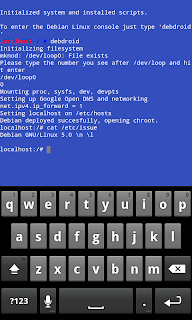
Now to the juice of this Debian. This is one of the reasons, we like this a lot – Run Ettercap in a promiscuous mode:
ifconfig eth0 promisc
cd /root/tools/
./etrun
That’s all! You can now sniff the WLAN traffic with un-encrypted credentials and use the capture file later with something like Wireshark. The author plans on adding GUIs for tools such as NMAP, etc. It does not require a lot of dependencies either. It just requires the following:
Root access
Busybox
Kernel that supports loopback devices and ext2 (Tested on various Cyanogen Mod nightly builds, HTC EVO to be precise)
Debroid helps you run a Debian system with a lot of utilities that help you sniff packets. In addition to various other tools and libraries, it contains tools such as:
- openssh
- libpcap
- libpcap-dev
- ettercap
- wireshark
- carwhisperer
- btscan
- NMAP
- ntbscan
These come pre-installed with the Debian image. To install, simply download the image from the links provided and follow these steps:
Unzip the .zip and .7z files and copy all the contents to /sdcard/debian/
Run your preferred terminal emulator and run bash with su.
Install debroid with – sh ./sdcard/debian/debian.sh
Boot into debian with the following command – debroid and voila!
You will be presented with a similar screen:

Now to the juice of this Debian. This is one of the reasons, we like this a lot – Run Ettercap in a promiscuous mode:
ifconfig eth0 promisc
cd /root/tools/
./etrun
That’s all! You can now sniff the WLAN traffic with un-encrypted credentials and use the capture file later with something like Wireshark. The author plans on adding GUIs for tools such as NMAP, etc. It does not require a lot of dependencies either. It just requires the following:
Root access
Busybox
Kernel that supports loopback devices and ext2 (Tested on various Cyanogen Mod nightly builds, HTC EVO to be precise)
Wednesday, February 23, 2011
Tuluka kernel inspector : Rootkit detector
Tuluka is very effective tool for professionals who need to find malicious programs in system

Tuluka is a new powerful AntiRootkit, which has the following features:
- Detects hidden processes, drivers and devices
- Detects IRP hooks
- Identifies the substitution of certain fields in DRIVER_OBJECT structure
- Checks driver signatures
- Detects and restores SSDT hooks
- Detects suspicious descriptors in GDT
- IDT hook detection
- SYSENTER hook detection
- Displays list of system threads and allows you to suspend them
- IAT and Inline hook detection
- Shows the actual values of the debug registers, even if reading these registers is controlled by someone
- Allows you to find the system module by the address within this module
- Allows you to display contents of kernel memory and save it to disk
- Allows you to dump kernel drivers and main modules of all processes
- Allows you to terminate any process
- Is able to dissasemble interrupt and IRP handlers, system services, start routines of system threads
- Allows to build the stack for selected device
- Much more..

Tuluka is a new powerful AntiRootkit, which has the following features:
- Detects hidden processes, drivers and devices
- Detects IRP hooks
- Identifies the substitution of certain fields in DRIVER_OBJECT structure
- Checks driver signatures
- Detects and restores SSDT hooks
- Detects suspicious descriptors in GDT
- IDT hook detection
- SYSENTER hook detection
- Displays list of system threads and allows you to suspend them
- IAT and Inline hook detection
- Shows the actual values of the debug registers, even if reading these registers is controlled by someone
- Allows you to find the system module by the address within this module
- Allows you to display contents of kernel memory and save it to disk
- Allows you to dump kernel drivers and main modules of all processes
- Allows you to terminate any process
- Is able to dissasemble interrupt and IRP handlers, system services, start routines of system threads
- Allows to build the stack for selected device
- Much more..
Subscribe to:
Posts (Atom)